
Save hours of manual formatting—spend your time on talent strategy, not adjusting cell borders
⭐⭐⭐⭐⭐ Rated 5/5 on Google Workspace Marketplace
👥 Join 1,000+ users saving hours every week
🔒 Your data is secure – we never store employee information
✅ No credit card required for trial
“Works perfectly. Simple to use and does exactly what it describes. If you’re looking to make a 9 Block Graphic for a presentation, highly recommend using this Add On. Thank you!” – Garrett Houghton – Creative Technologist

Three Simple Steps
9 Box Maker generates formatted 9-box talent grids directly from your spreadsheet data.
- 📝 Enter your employee data (name, performance score, potential score)
- 🖱️ Click Make Matrix to generate the matrix instantly
- 📋 Copy the formatted grid directly into Google Docs or Slides
Features
- Generate from a table. Score each person on both axes (1 to however many levels you chose, up to 5), and the add-on builds the grid automatically.
- Update with one click. Change your data, click Make matrix, and the grid recreates itself. No manual adjustments needed.
- Auto-resize boxes. Grid cells expand to fit your data—no fussing with templates.
- Multi-team mode. Add a “Team” column and generate separate 9-box grids for each team automatically.
- Copy anywhere. Paste the formatted output directly into Google Docs or Slides.
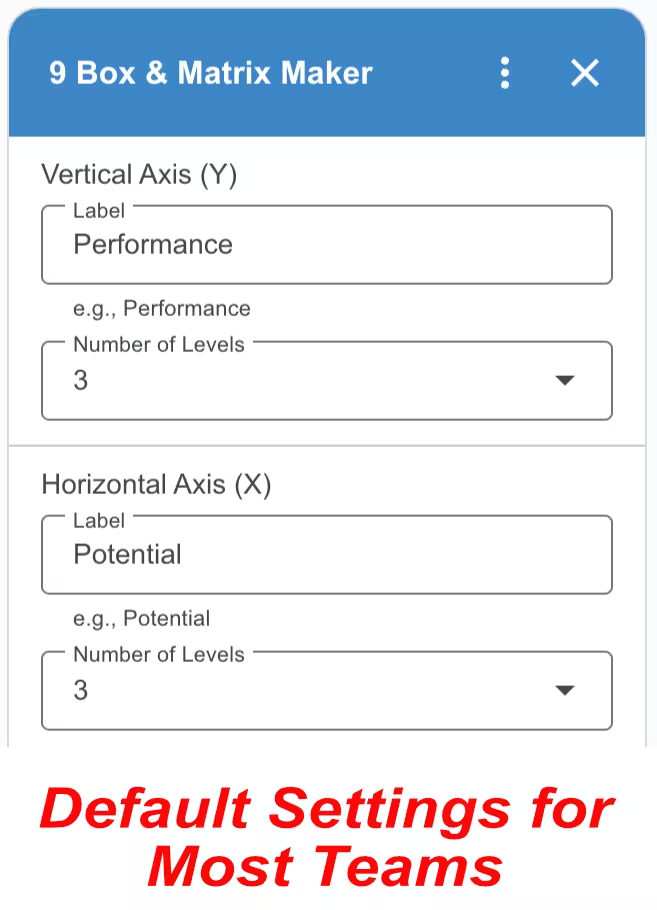
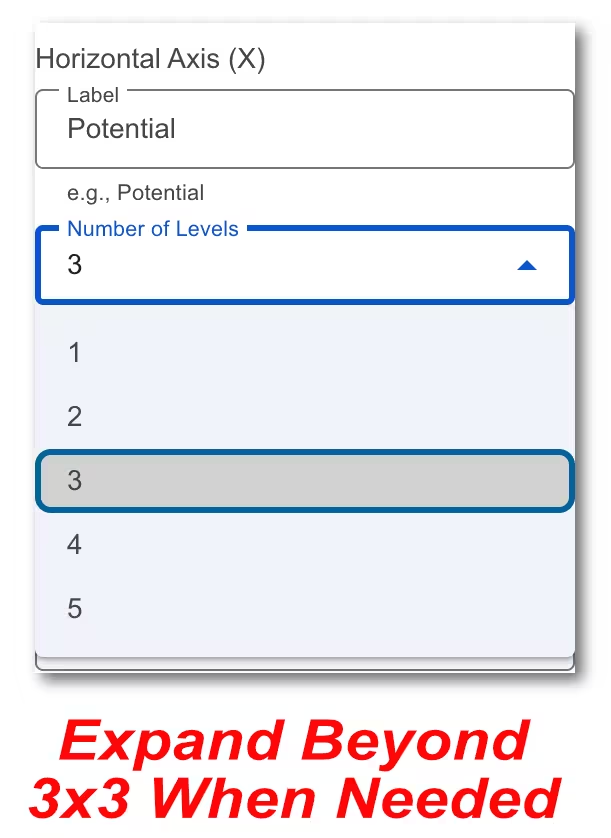
Customize everything (if you need to). The default 3×3 grid works for most teams. But if your organization uses a different scale, you can adjust the grid size (up to 5×5), rename the axes, and set custom level labels like “Needs Development” or “Ready Now.” Set these before you make the template — that is what its columns are built from.
🛡️ Privacy & Security Guarantee
Your data stays in Google. We do not host your employee information on our servers. 9 Box Maker acts as a bridge to format your data, ensuring your company remains in full control of its sensitive talent metrics at all times.
Video Tutorials


Pricing
9 Box Maker is free for three days, then $19 per year. Use your Google account’s email address at checkout.
Multiple User Pricing
We offer the following discounts for multiple users in the same organization. Contact us before you checkout.
| Quantity | Annual Price |
|---|---|
| 2 – 10 | $15 |
| 11 – 50 | $11 |
| 51 – 200 | $6 |
| 201+ | $4 |
FAQ
What is a 9-box grid?
A 9-box grid is a talent management tool that plots employees on two axes: performance (how well they do their current job) and potential (their capacity for growth). It’s commonly used during performance reviews to identify high performers, development candidates, and succession planning opportunities.
How do I update the grid when my data changes?
Just update your source data and click Make matrix again. The add-on regenerates the entire grid with the new information—no need to manually move names between boxes or reformat anything.
How do I use the add-on with my iPad?
Open your Google Sheet in the Safari web browser instead of Chrome or the Sheets mobile app. If you still do not see the full version of Google Sheets, go to Settings, then Safari, and select Request desktop website. Toggle this setting to on.
Is my data secure?
Yes. 9 Box Maker is built so that your employee data never leaves your spreadsheet.
- No Data Storage: We do not maintain databases to store your spreadsheet content. Names and scores are never transmitted to us.
- Local Execution: The logic to generate your grid runs entirely within your own Google Sheets instance.
- Limited Access: The add-on can only see the spreadsheet it is open in — not your Drive, and not your other files.
- License Check: Each time you open the add-on it sends your Google account email address over an encrypted connection to verify your subscription. Nothing about your spreadsheet goes with it.
- Anonymous Usage Data: We record which features get used so we know what to improve. No spreadsheet content is included.
- GDPR & CCPA Compliant: We do not collect, store, or sell employee information.
Subscriber Portal | Terms of Service | Privacy Policy | Contact