
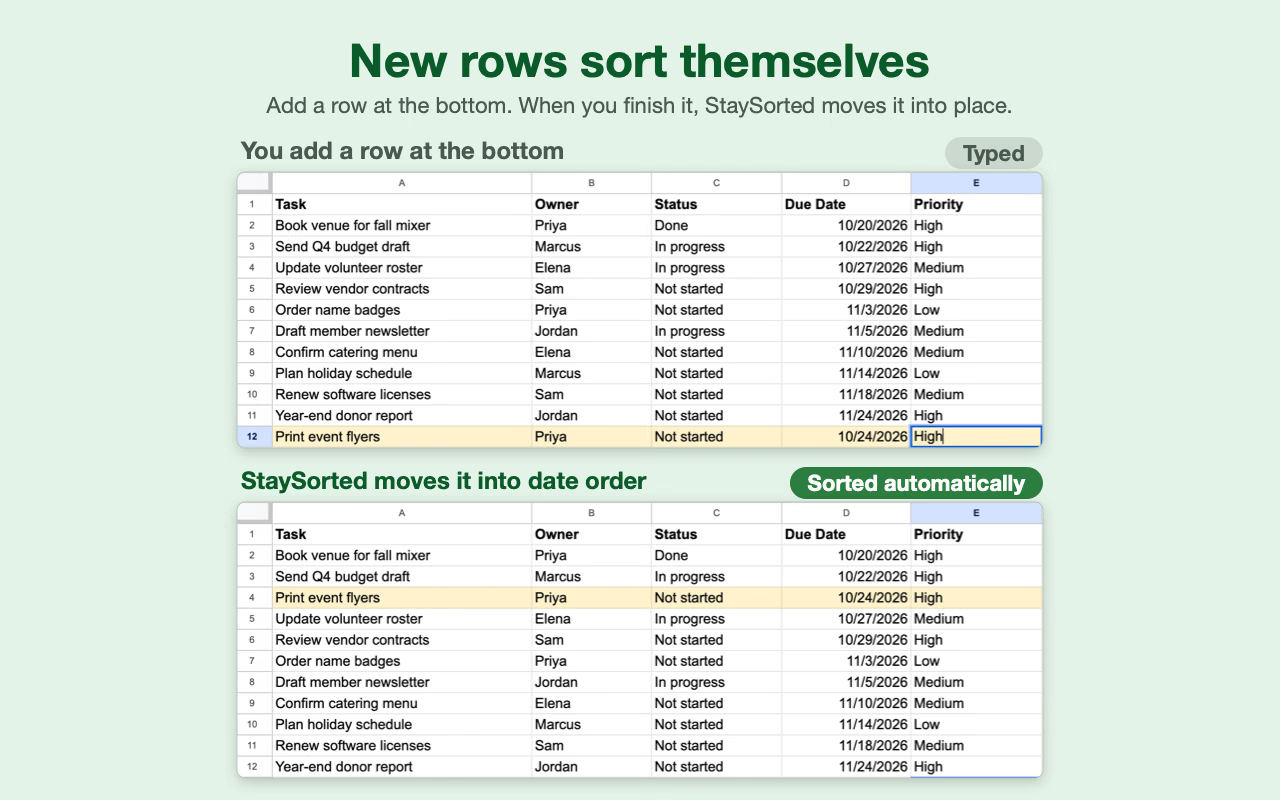
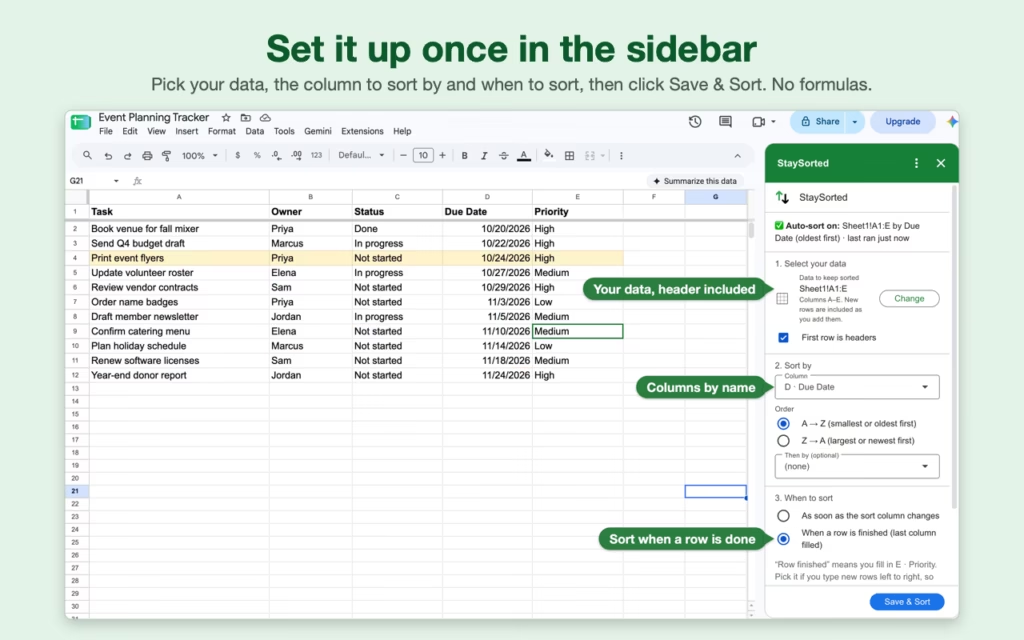
 StaySorted keeps your data in order, even after adding new rows. After installing this add-on, the rows in your table will automatically sort based on the column you choose.
This no-code solution works on tables of any size and all data types. No formulas are needed; tell the add-on where your data is and how to sort it.
You no longer need to continually re-sort your table after every new entry.
Trusted by Over 40,000 Users
-June S.
⭐️⭐️⭐️⭐️⭐️
An indispensable tool. Works as advertised, and easy to configure. Adam is very available and helpful with any questions.

-Elizabeth C.
⭐️⭐️⭐️⭐️⭐️
This extension is saving me so much time since I do multiple column sorts all day long.

Who Uses StaySorted?
- Sales Teams: Keep CRM data automatically ranked by deal size or close date
- Teachers: Maintain grade books sorted by student performance
- Inventory Managers: Track stock levels in real-time sorted order
- Project Managers: Auto-sort tasks by priority or deadline
- Event Coordinators: Keep registration lists organized as responses arrive
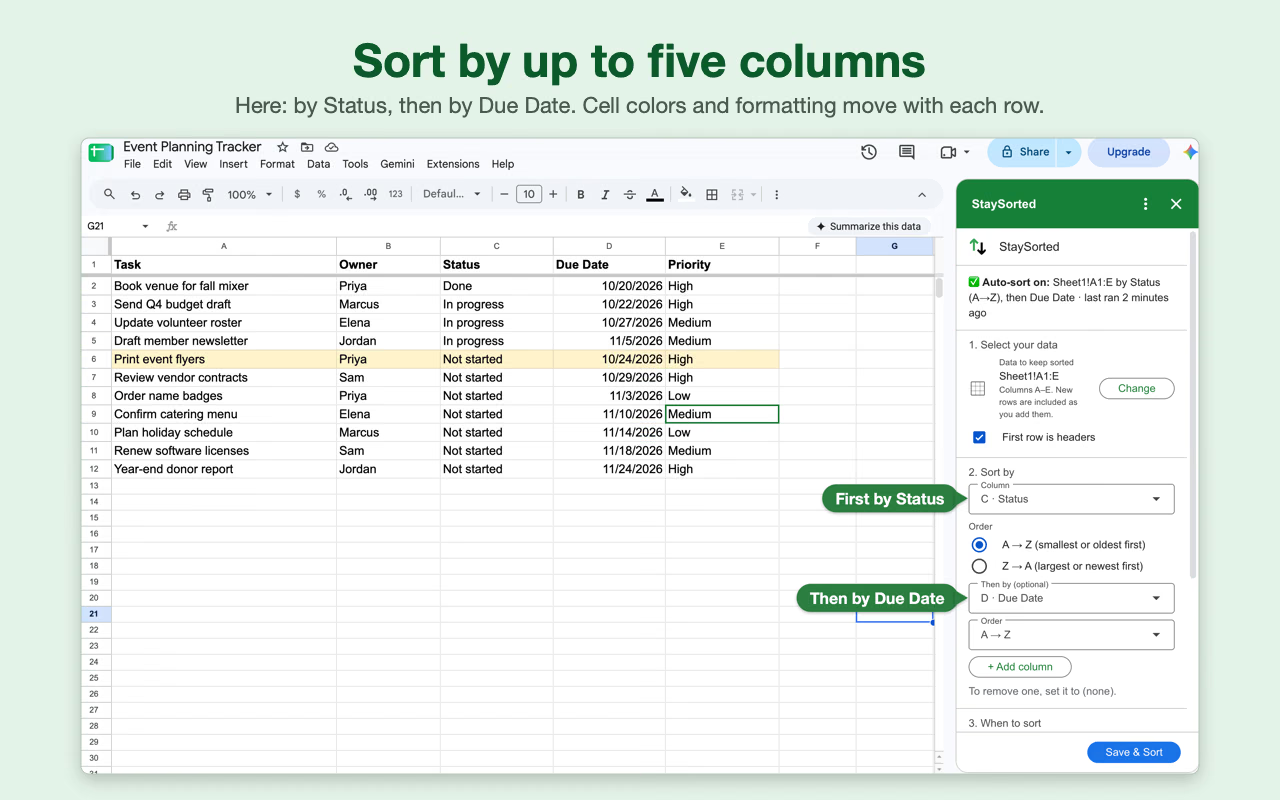
Multi-Column Sort
You can add additional columns to your sorts. StaySorted will sort by each column in the order you specify.
The columns can contain text, numbers, or boolean (TRUE/FALSE) values.
Multi-Range Sorts
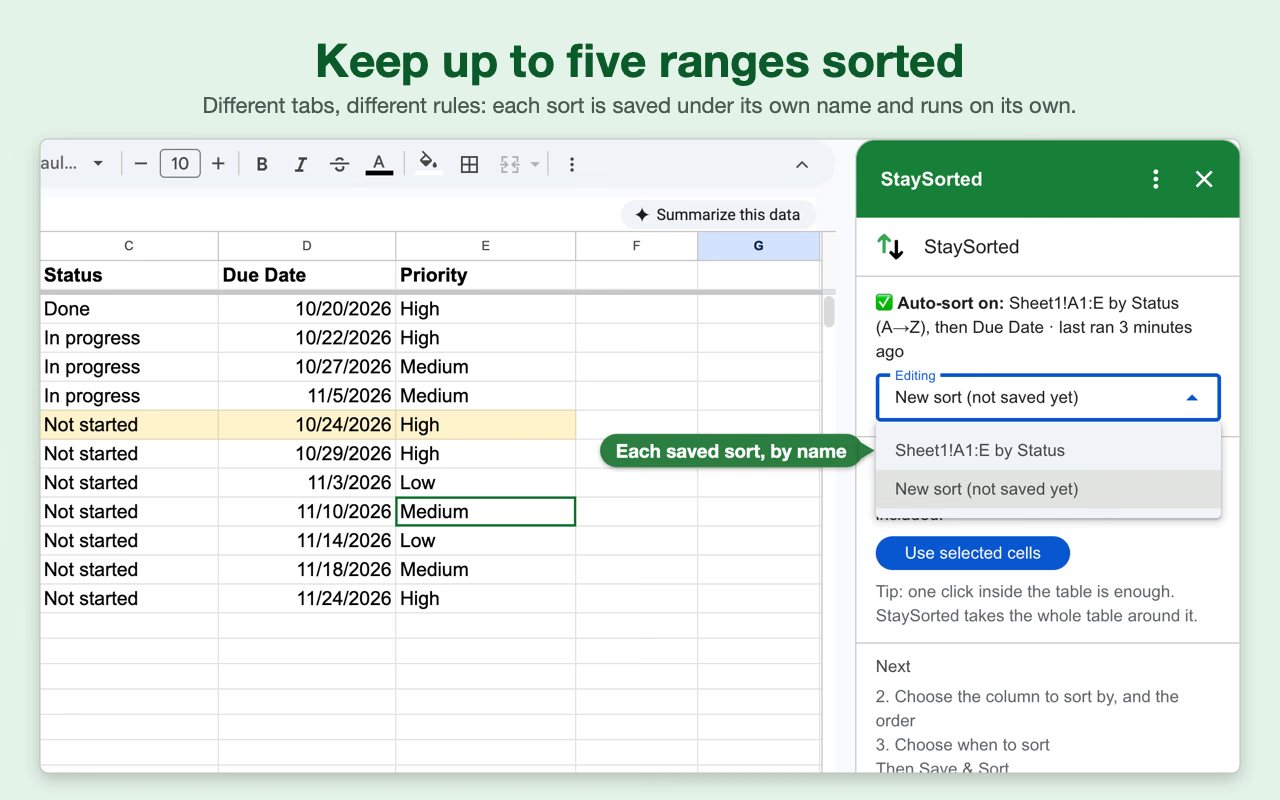
Use several active sorts simultaneously amongst multiple sheets. Keep complex spreadsheets sorted according to your exact specifications.
Twice-Daily Sorter
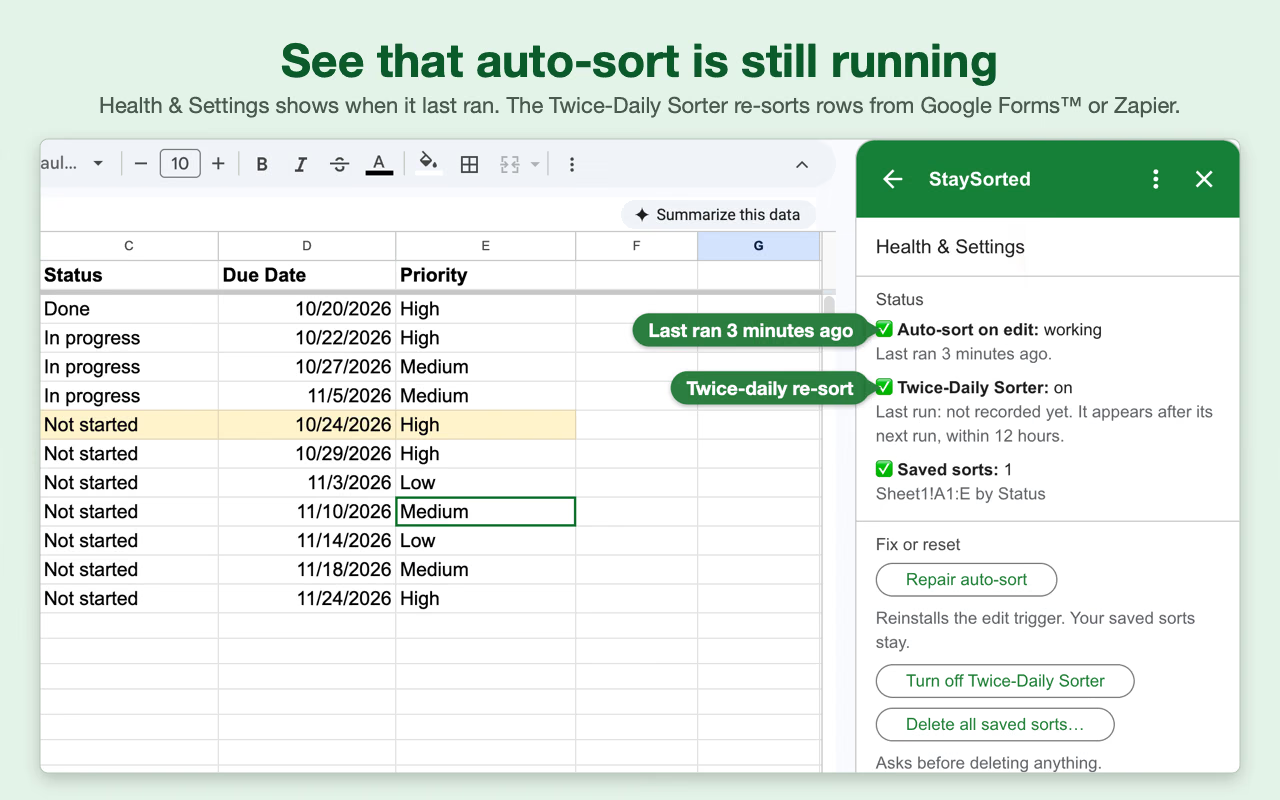
The add-on automatically sorts your data when you or your collaborators add or edit rows. However, rows added by other apps (like Google Forms or Zapier) don’t count as edits, so they don’t trigger the automatic sort.
To handle this, turn on the 12-hour timer. It re-sorts all your saved ranges twice a day, so all your data – whether typed in or added by another app – stays sorted, even when nobody has the sheet open.
StaySorted vs Manual Sorting vs SORT Formula
| Feature | Manual Sort | SORT Formula | StaySorted |
|---|---|---|---|
| Works with new rows | ❌ Must re-sort | ⚠️ Requires formula knowledge | ✅ Automatic |
| Multi-column sorting | ⚠️ Complex steps | ⚠️ Complex nested formulas | ✅ Simple UI |
| Maintains cell formatting | ✅ Yes | ❌ Creates new data | ✅ Yes |
| Learning curve | ⚠️ Medium | ❌ High | ✅ None |
Pricing
The StaySorted add-on is free for seven days then $4.50/month (less than a coffee!) or $47 for a yearly license.
Multiple User Pricing
Each person who sets up their own sorts needs a license. Collaborators who only add or edit rows in a sheet someone else set up don’t need StaySorted. If several people in your organization set up their own sorts, we offer these discounts. Contact us before you check out.
| Quantity | Monthly Price | Yearly License |
|---|---|---|
| 2 – 10 | $3.49 | $29 |
| 11 – 50 | $2.49 | $15 |
| 51 – 200 | $1 | $7 |
| 201 + | $.75 | $4 |
Video Instructions


FAQ
Are there limitations on the usage of this app?
StaySorted functions per the daily quotas Google imposes on all add-ons and apps. This limits the app’s run time per request and an overall daily run time. The limits are the same in the free and paid versions of StaySorted.
In a shared sheet, auto-sort works on every editor’s changes, not just yours.
How do I solve the Permission Denied error code?
The error message “We’re sorry, a server error occurred while reading from storage. Error code PERMISSION_DENIED.” occurs when a user is logged into multiple Google accounts. Log out of all other Google accounts, restart your browser, and start the add-on again.
How do I use the add-on with my iPad?
Open your Google Sheet in the Safari web browser instead of Chrome or the Sheets mobile app. If you still do not see the full version of Google Sheets, go to Settings, then Safari, and select Request desktop website. Toggle this setting to on.
Does StaySorted work with data from Google Forms or Zapier?
Yes. Rows from Google Forms or Zapier are sorted by the Twice-Daily Sorter: a 12-hour timer that re-sorts all your saved ranges whether or not anyone has the sheet open.
Can my data have merged cells?
While cells in non-sort columns can have horizontal merges, it is a best practice to have no merged cells in your table. Vertically merged cells are prohibited.
How is StaySorted different from the SORT function?
The SORT function creates a copy of your data in a new location and requires you to write formulas. If you add new rows to your original data, the SORT function won’t automatically update unless you modify the formula range. StaySorted works directly on your existing data—it automatically detects when you add new rows and sorts them in place. No formulas needed.
Can I sort multiple sheets at the same time?
Yes! You can set up different sort rules for multiple sheets or ranges within the same spreadsheet. Each sheet can have its own sorting criteria, and StaySorted will maintain all of them simultaneously. Use the Multi-Range Sorts feature to manage sorts across your entire workbook.
Does StaySorted slow down my spreadsheet?
No. StaySorted runs only when you add or edit rows (and twice a day if you turn on the timer). It doesn’t run continuously in the background, so it won’t affect your spreadsheet’s performance during normal use. Most sorts finish in a few seconds; very large ranges take longer, and you may notice a brief pause while the sort runs.
Can I undo a sort if I make a mistake?
Yes. Like any change in Google Sheets, you can use Ctrl+Z (or Cmd+Z on Mac) to undo a sort immediately after it happens. You can also access version history through File > Version History to restore your sheet to any previous state. We recommend testing your sort settings on a small range first before applying them to your full dataset.
Their new rows still sort. Auto-sort is attached to the sheet and runs under the account of the person who set it up, so it fires whenever anyone with edit access adds or changes a row. Other editors don’t need to install StaySorted or set up the sort again. If the person who set it up loses edit access, sorting stops until someone else sets it up.
Will StaySorted work with Google Forms responses?
Yes. Turn on the Twice-Daily Sorter and StaySorted checks your sheet every 12 hours and sorts new form responses, even when the sheet is closed. It’s a good fit for survey responses, registration lists, or order forms that you review once or twice a day.
Can I sort by color or conditional formatting?
Currently, StaySorted sorts by cell values (text, numbers, dates, or TRUE/FALSE). It doesn’t sort based on cell color or conditional formatting rules. However, if your conditional formatting is based on cell values, you can sort by those underlying values to achieve a similar result.
Google Sheets and Google Forms are trademarks of Google LLC. StaySorted is not affiliated with or endorsed by Google. Zapier is a trademark of Zapier, Inc.
Related Articles
SORT – Learn about the built-in sorting function
FILTER – See the built-in filtering function
Subscriber Portal | Terms of Service | Privacy Policy | Contact