
Optimization solver for Google Sheets
Real optimization, inside Google Sheets.
Linear, integer, and nonlinear models with the same Set Objective / Variables / Constraints workflow you know from Excel’s Solver. Or describe your problem in plain English and let ✨AI build the model.
Install Free from Google Workspace Marketplace
Free tier — no credit card, no expiration.
Why SolveSheet?
📈 Results that match the textbook
Many free Google Sheets “solvers” silently return wrong answers on integer or nonlinear problems. SolveSheet runs proven, industry-standard optimization engines — Simplex for LP, IPOPT for nonlinear, CBC for integer, Bonmin for MINLP.
🎯 The Solver workflow you know
Set Objective. By Changing Variable Cells. Subject to Constraints. Click Solve. If you’ve used Excel Solver, you’re already done. Models built for Excel reproduce in SolveSheet with the same logic.
📊 Reports that explain the answer
Every solve can produce an Answer Report. Pro adds Sensitivity and Limits Reports — shadow prices, reduced costs, allowable ranges — formatted to match the Excel output your professor or auditor expects.
✨ Describe it. SolveSheet builds it. Beta
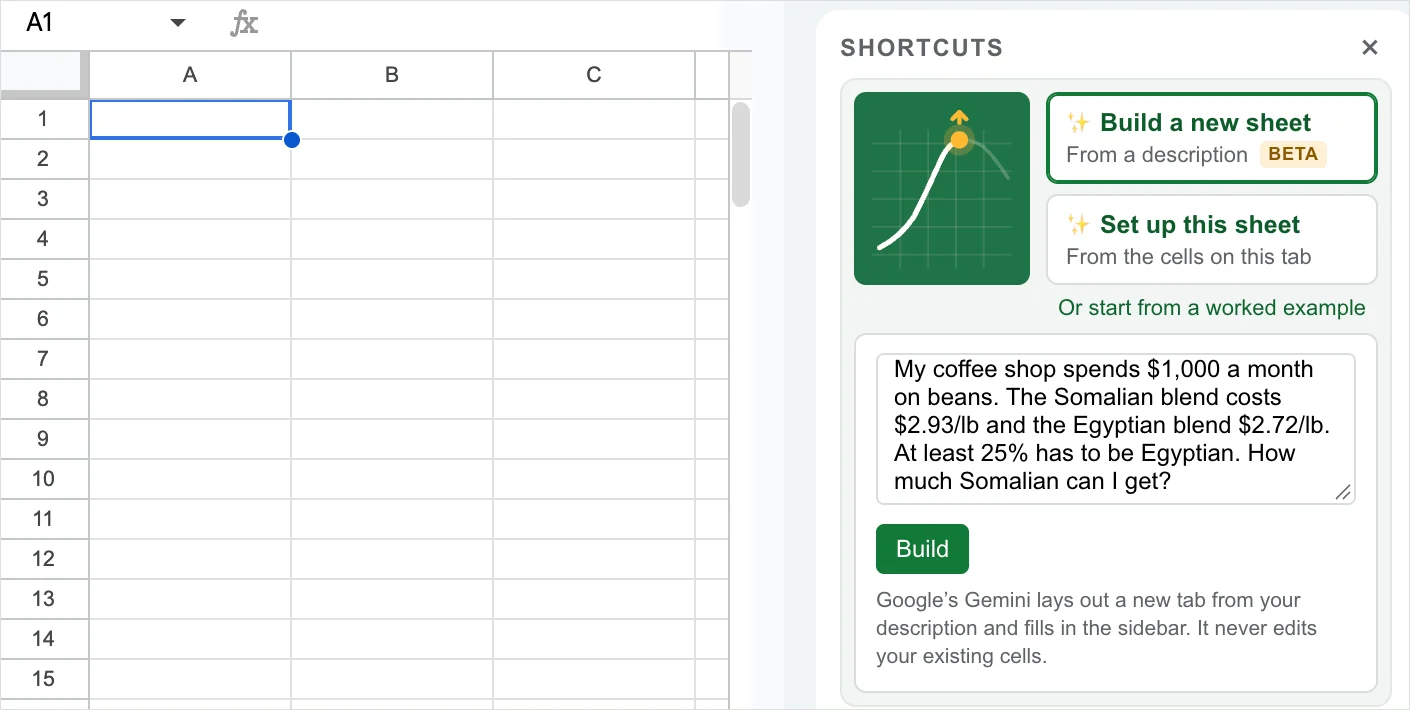
Not sure how to lay out an optimization model? Tell SolveSheet about your problem the way you’d tell a colleague: “I own a coffee shop and need to decide which suppliers to order from. One sells beans only in bulk at $10 a pound, 50 pounds minimum…”
Build a new sheet
SolveSheet lays out a new tab with your data, the formulas, and the objective, variables, and constraints already filled in. Any numbers it had to assume are highlighted in blue for you to replace. Want a change? Ask in plain English: “add a third supplier at $11 a pound.”
Set up this model
Already have your data in a sheet? SolveSheet reads the tab and suggests the objective, variable cells, and constraints, including which decisions must be whole numbers or yes/no. Check the suggestion, then apply it with one click.
Your existing cells are never edited: Build always writes to a new tab. Free includes 2 AI uses a month, Pro 50, and Business 100.
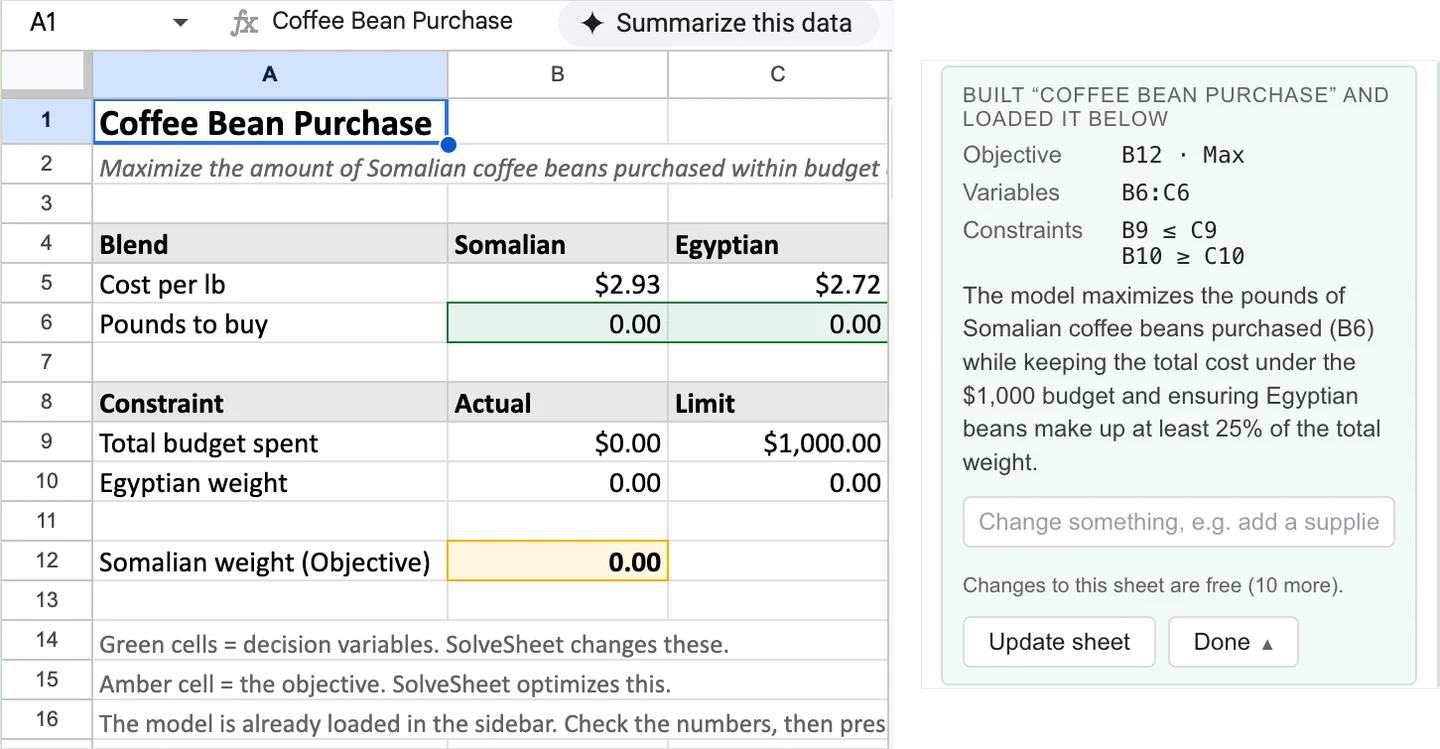
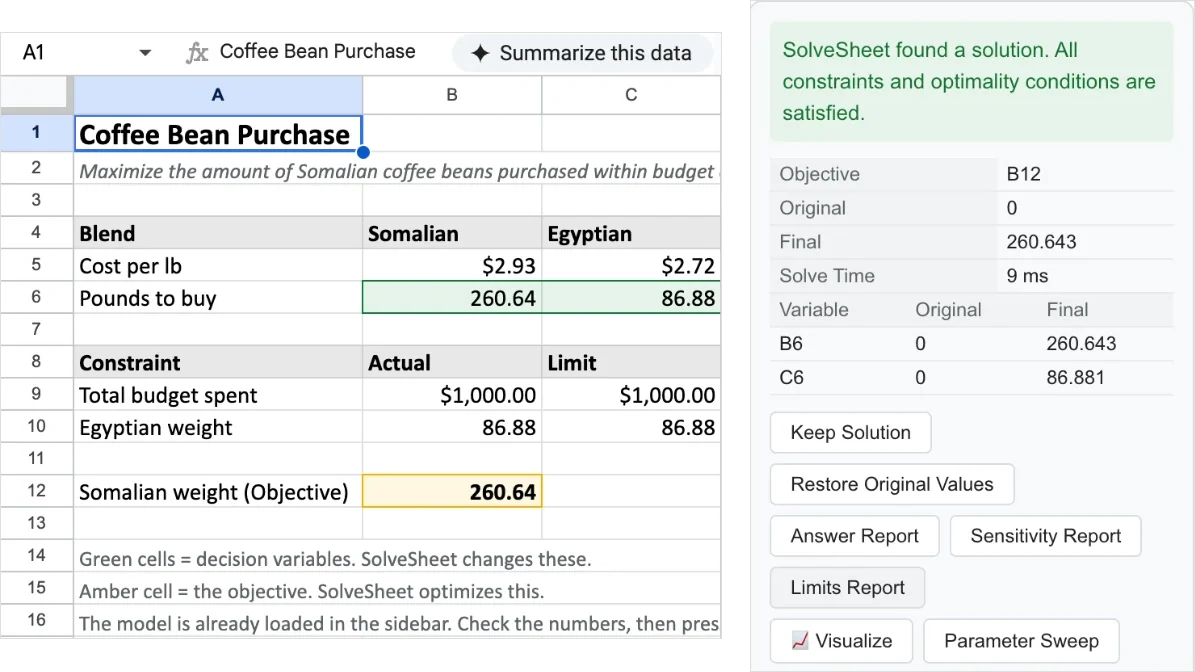
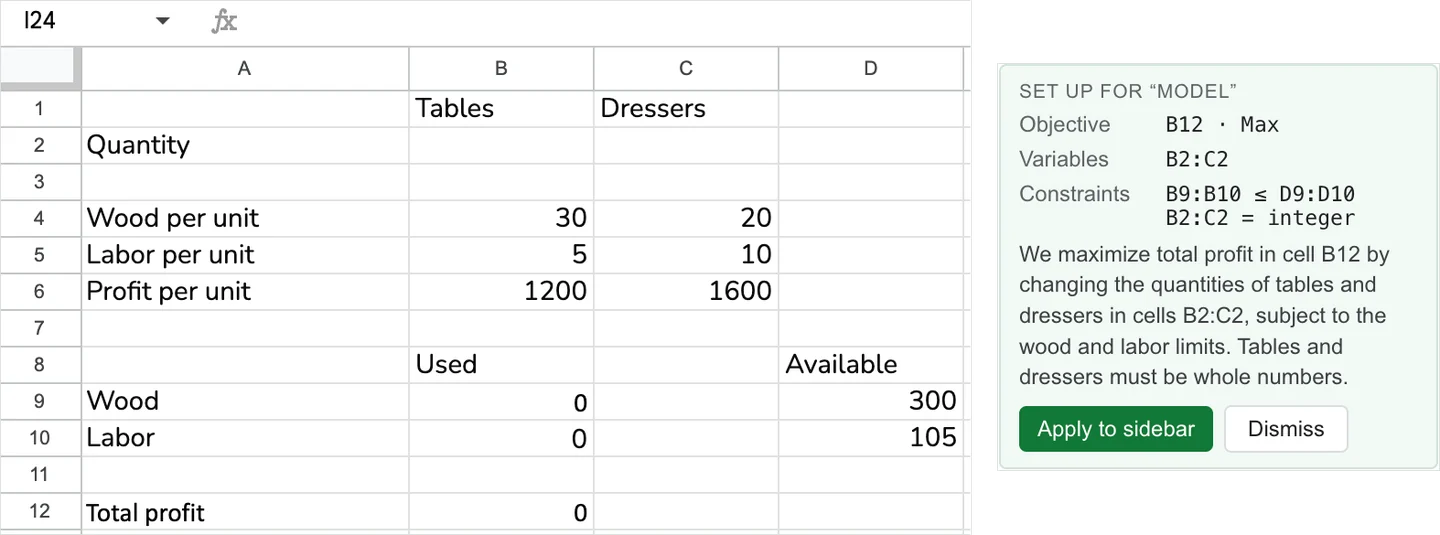
From spreadsheet to optimal solution in 3 steps
If you’ve used Excel’s Solver, these steps will look familiar. Or let AI handle steps 1 and 2: describe your problem and SolveSheet builds the sheet and fills in the model.
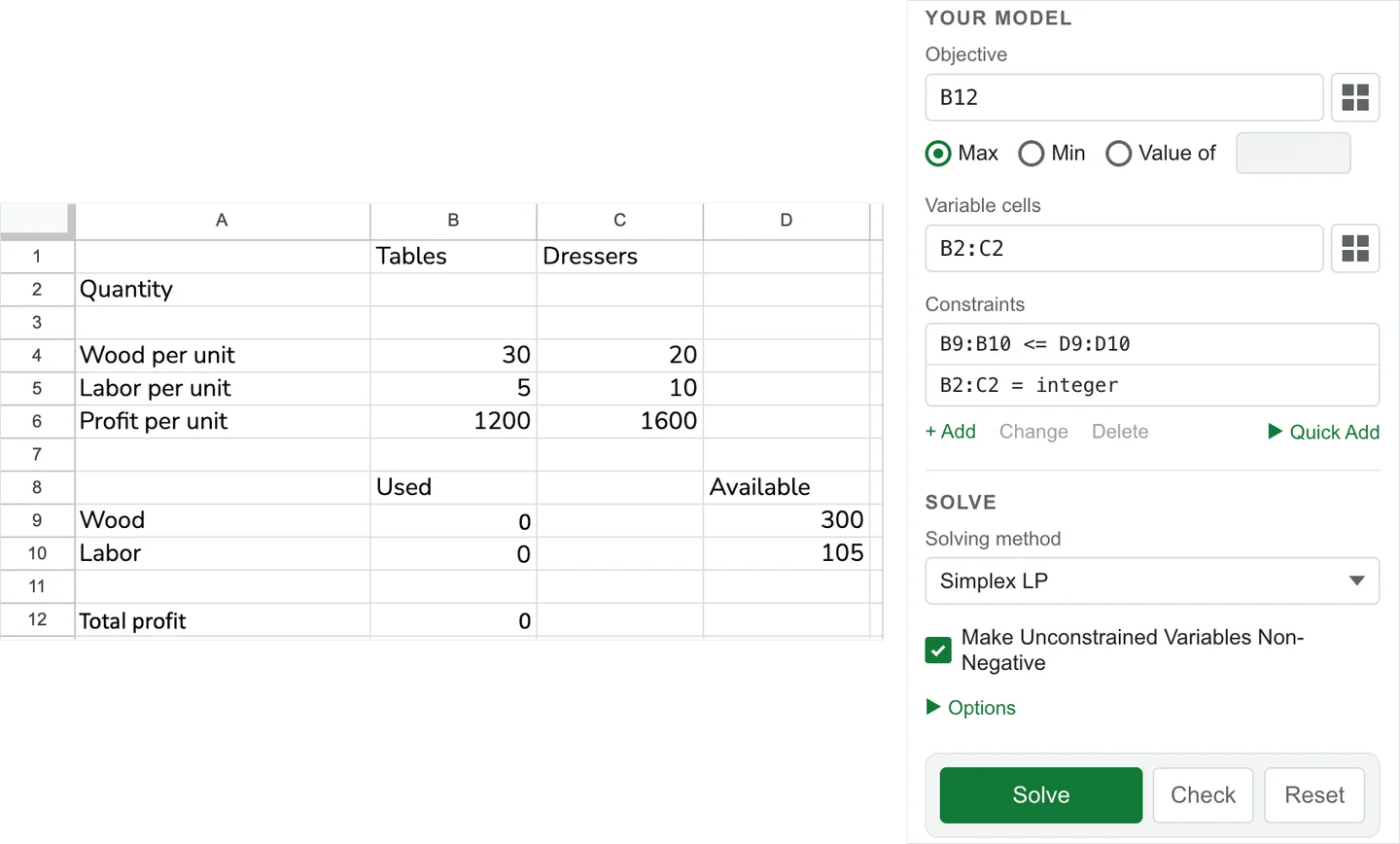
- Set your objective. Pick the cell to maximize, minimize, or drive to a target value.
- Define variables and constraints. Choose decision variable cells and add constraints (≤, ≥, =, integer, binary, AllDifferent).
- Click Solve. SolveSheet finds the optimum and writes the values back to your sheet.
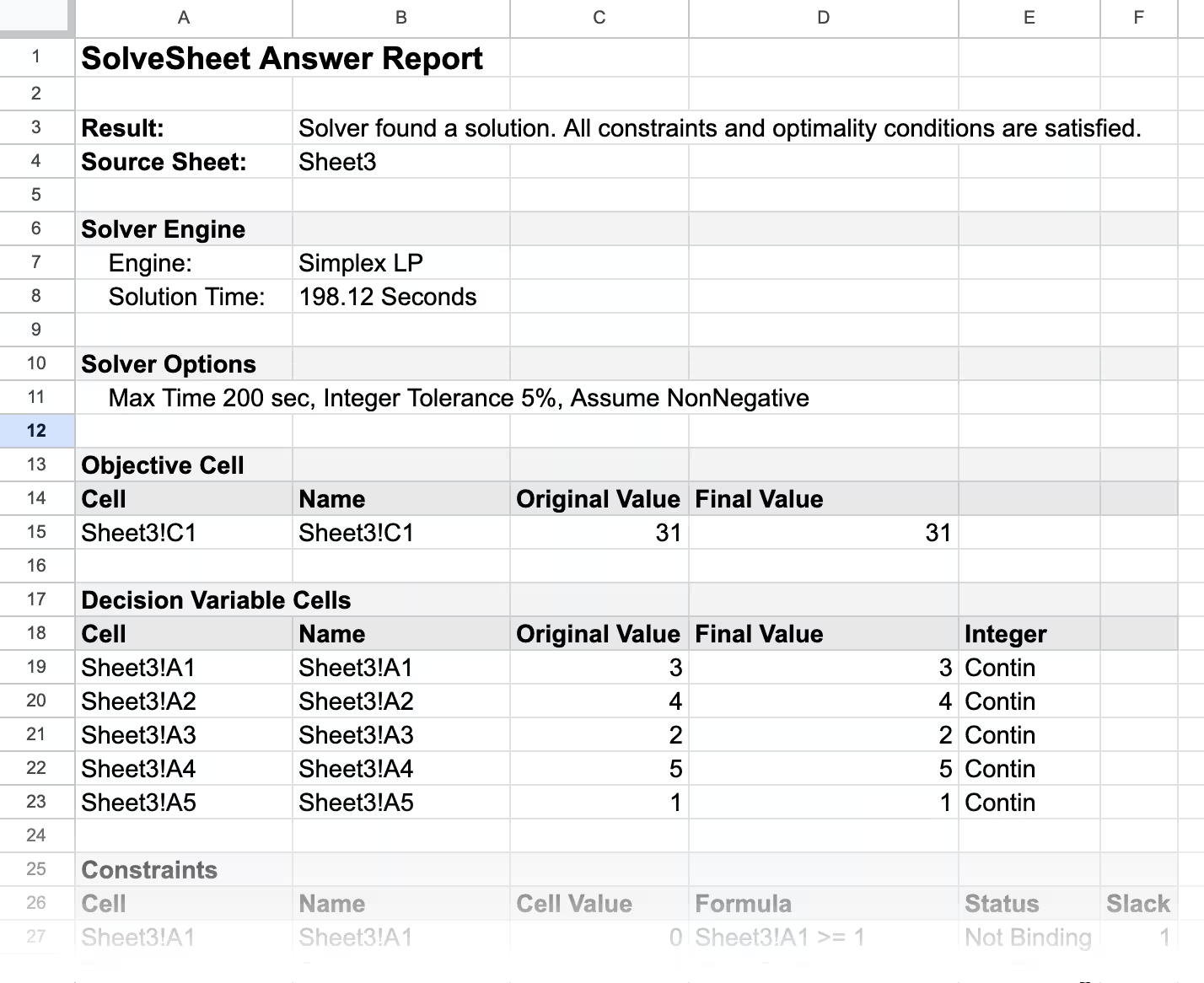
Each solve can also write an Answer Report to a new sheet, laid out like Excel’s: the original and final value of every cell, and whether each constraint is binding and by how much.
Solving methods built in
- Simplex LP — fast, exact solver for linear problems. Free tier.
- Mixed-Integer Linear (MILP) — linear models with integer or binary decisions. Pro and Business.
- Cloud Nonlinear (NLP) — smooth nonlinear objectives and constraints via cloud-powered IPOPT. Pro and Business; Free includes 3 cloud solves a month.
- Cloud MINLP — nonlinear models with integer variables, via Bonmin. Business only.
- Evolutionary — genetic algorithm for non-smooth, non-convex, or combinatorial problems (TSP, assignment, AllDifferent puzzles). Business only.
Reads the formulas real models use: SUMPRODUCT, SUMIF and SUMIFS, COUNTIFS, VLOOKUP, XLOOKUP, INDEX/MATCH, MMULT, LN, EXP, SQRT, NORM.INV, LET, IFS, LARGE/SMALL, MAX/MIN/ABS, and IF conditions on the decision variables — so portfolio, risk, scheduling, and finance models work as written.
How SolveSheet compares to free Sheets solver add-ons
| Free Sheets add-ons | SolveSheet | |
|---|---|---|
| Linear (LP) | Usually OK | ✓ |
| Integer / Binary (MILP) | Often wrong or missing | ✓ Verified |
| Nonlinear (NLP / MINLP) | Not supported | ✓ IPOPT / Bonmin |
| Combinatorial (AllDifferent, TSP) | Not supported | ✓ Evolutionary |
| Sensitivity / Limits Reports | — | ✓ Excel-compatible |
| Matches Excel Solver workflow | Varies | ✓ Same vocabulary, same fields |
| Builds the model from a description | — | ✓ AI shortcuts (Beta) |
Who uses SolveSheet
- Operations Research / Management Science students — Ragsdale’s Spreadsheet Modeling and Decision Analysis, Winston, Hillier, Anderson. Free tier handles most homework problems (≤10 vars, ≤5 constraints).
- Business analysts — product mix, resource allocation, transportation/assignment, workforce scheduling, capital budgeting.
- Finance teams — portfolio optimization, asset allocation, risk parity, blended-cost minimization.
- Operations teams — production planning, inventory optimization, supply chain, facility location.
- Marketing — media-mix modeling, budget allocation across channels.
- Small business owners — supplier choice, staffing, and order planning, described in plain English.
Video Tutorial
Plans & pricing
Free
$0
For students, light use, and trying it out.
- Up to 10 variables, 5 constraints
- Simplex LP solver
- Answer Report
- 3 cloud solves/month
- 2 AI uses/month
- Community support
Pro
$49/year
or $5.99 / month. Save 32% annually.
- Up to 200 variables, 100 constraints
- LP, MILP, and Cloud Nonlinear (NLP)
- Answer, Sensitivity, and Limits Reports
- Save & Load Models · Parameter Sweep · Feasibility Chart
- 100 cloud solves/month
- 50 AI uses/month
- Email support
Try Pro free for 7 days from inside the add-on (includes 2 AI uses).
Business
$129/year
or $12.99 / month.
- Unlimited variables and constraints
- Everything in Pro, plus MINLP and Evolutionary solvers
- 400 cloud solves/month, priority queue
- 100 AI uses/month
- Email support, same-business-day response
Use your Google account email at checkout so your license activates correctly.
Team discounts: volume pricing for 2+ seats — contact us for a quote.
Compare all features
| Free | Pro | Business | |
|---|---|---|---|
| Variables | 10 | 200 | Unlimited |
| Constraints | 5 | 100 | Unlimited |
| Linear (LP) | ✓ | ✓ | ✓ |
| Mixed-Integer Linear (MILP) | — | ✓ | ✓ |
| Cloud Nonlinear (NLP) | 3 solves/month | ✓ | ✓ |
| Cloud MINLP | — | — | ✓ |
| Evolutionary solver | — | — | ✓ |
| Cloud solves / month | 3 | 100 (300 s/call) | 400 (priority queue) |
| AI uses / month (Beta) | 2 | 50 | 100 |
| Answer Report | ✓ | ✓ | ✓ |
| Sensitivity Report | — | ✓ | ✓ |
| Limits Report | — | ✓ | ✓ |
| Parameter Sweep | — | ✓ | ✓ |
| Feasibility Chart (2-variable LP) | — | ✓ | ✓ |
| Save & Load Models | — | ✓ | ✓ |
| Support | Community | Email, same-business-day | |
| Deployment | Per-user | Per-user | Per-user or admin-managed Workspace |
FAQ
What kinds of optimization problems can SolveSheet handle?
Linear programming (LP), integer and mixed-integer programming (IP / MILP), smooth nonlinear (NLP), MINLP, and combinatorial problems via the Evolutionary solver. Common applications: product mix, transportation, assignment, blending, scheduling, capital budgeting, portfolio optimization, curve-fitting.
Can AI build my model for me?
Yes, in Beta. Click Build a new sheet in the sidebar’s Shortcuts and describe your problem in a few sentences. SolveSheet lays out a new tab with the data and formulas and fills in the objective, variables, and constraints. Numbers it had to assume are highlighted in blue so you can replace them with yours. If your data is already in a sheet, click Set up this model instead. Always check the model before relying on the answer.
What does the AI do with my data?
The AI shortcuts send the description you type, the labels, numbers, and formulas on the tab you ask about, or your solved answer, to Google’s Gemini on Vertex AI. Nothing is sent unless you click Build, Set up, or Answer Story, and your existing cells are never edited. See our Privacy Policy.
Is SolveSheet a replacement for Excel’s Solver?
For users who work in Google Sheets, yes. Same Set Objective / Variable Cells / Constraints workflow. Same problem classes — LP, MILP, smooth NLP. Models built for Excel’s Solver reproduce in SolveSheet using the same logic.
Will SolveSheet work for my Operations Research / Management Science class?
Yes. If your class uses Excel Solver and you’d rather work in Google Sheets, SolveSheet is designed to give matching results. The free tier handles most introductory homework problems (≤10 variables, ≤5 constraints).
Is there a free version?
Yes — a permanent free tier. No credit card, no expiration. When you need more, you can try Pro free for 7 days from inside the add-on.
What are the limits on the Free plan?
Up to 10 decision variables and 5 constraints, Simplex LP, Answer Report, 3 Cloud Nonlinear solves a month, and 2 AI uses a month. Pro raises caps to 200 / 100 and unlocks MILP, Cloud Nonlinear, all reports, Parameter Sweep, Save & Load, the feasibility chart, and 50 AI uses a month. Business removes all variable / constraint caps and adds MINLP and Evolutionary solvers.
Can I cancel or get a refund?
Cancel anytime from the Subscriber Portal; you keep access through the end of your billing period. We offer a full refund within 14 days of your first paid charge — just email us.
Does SolveSheet work on iPad or mobile?
SolveSheet runs in the Google Sheets sidebar, which works best on desktop browsers. On iPad, open your sheet in Safari with “Request desktop website” enabled for the full sidebar experience.
Can I save and reuse my optimization models?
Yes — Save & Load is included on Pro and Business. Save your objective, variables, and constraints with the spreadsheet and rerun any time without re-entering.
Can I visualize the feasible region for 2-variable problems?
Yes. Pro and Business include a native Google Sheets feasible-region chart for 2-variable LPs — useful for teaching, learning, or sanity-checking before scaling up.
SolveSheet won’t open, or says it needs permission. What do I do?
When SolveSheet was installed, one of the permission boxes on Google’s consent screen was left unticked. Until it’s granted, SolveSheet can’t show its sidebar, or can’t read your plan and shows Free limits. It takes one click to fix: grant SolveSheet the permission. Google first asks you to confirm your account: click Continue. Then it lists the permissions: tick every box and click Allow. Go back to your spreadsheet and open Extensions ▸ SolveSheet ▸ Start SolveSheet. If nothing was missing, the page simply closes itself after Continue.
Google Sheets and Gemini are trademarks of Google LLC. SolveSheet is not affiliated with or endorsed by Google.
Subscriber Portal | Terms of Service | Privacy Policy | Contact