
 StaySorted keeps your data in order, even after adding new rows. After installing this add-on, the rows in your table will automatically sort based on the column you choose.
This no-code solution works on tables of any size and all data types. No formulas are needed; tell the add-on where your data is and how to sort it.
You no longer need to continually re-sort your table after every new entry.

Trusted by Over 35,000 Users
-June S.
⭐️⭐️⭐️⭐️⭐️
An indispensable tool. Works as advertised, and easy to configure. Adam is very available and helpful with any questions.

-Elizabeth C.
⭐️⭐️⭐️⭐️⭐️
This extension is saving me so much time since I do multiple column sorts all day long.

Who Uses StaySorted?
- Sales Teams: Keep CRM data automatically ranked by deal size or close date
- Teachers: Maintain grade books sorted by student performance
- Inventory Managers: Track stock levels in real-time sorted order
- Project Managers: Auto-sort tasks by priority or deadline
- Event Coordinators: Keep registration lists organized as responses arrive
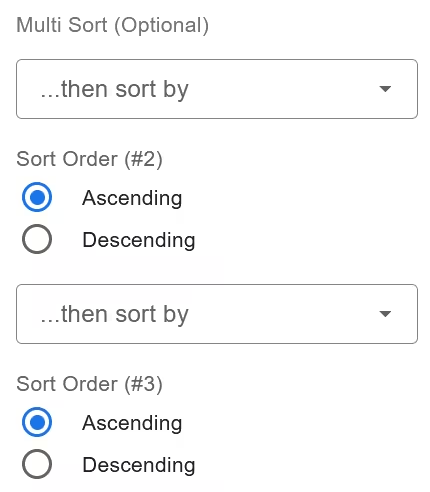
Multi-Column Sort
You can add additional columns to your sorts. StaySorted will sort by each column in the order you specify.
The columns can contain text, numbers, or boolean (TRUE/FALSE) values.
Multi-Range Sorts

Use several active sorts simultaneously amongst multiple sheets. Keep complex spreadsheets sorted according to your exact specifications.
Hourly Sorter
The add-on automatically sorts your data when you manually add rows. However, when data is added from external sources (like Google Forms or Zapier) while your sheet is closed, these changes don’t trigger the automatic sort.
To handle this, you can enable an hourly timer to periodically check and sort your sheet. This ensures that all data – whether added manually or from external sources – stays properly sorted, even when the sheet isn’t actively open.

StaySorted vs Manual Sorting vs SORT Formula
| Feature | Manual Sort | SORT Formula | StaySorted |
|---|---|---|---|
| Works with new rows | ❌ Must re-sort | ⚠️ Requires formula knowledge | ✅ Automatic |
| Multi-column sorting | ⚠️ Complex steps | ⚠️ Complex nested formulas | ✅ Simple UI |
| Maintains cell formatting | ✅ Yes | ❌ Creates new data | ✅ Yes |
| Learning curve | ⚠️ Medium | ❌ High | ✅ None |
Pricing
The StaySorted add-on is free for seven days then $4.50/month (less than a coffee!) or $47 for a yearly license.
Multiple User Pricing
We offer the following discounts for multiple users in the same organization. Contact us before you checkout.
| Quantity | Monthly Price | Yearly License |
|---|---|---|
| 2 – 10 | $3.49 | $29 |
| 11 – 50 | $2.49 | $15 |
| 51 – 200 | $1 | $7 |
| 201 + | $.75 | $4 |
Video Instructions


FAQ
Are there limitations on the usage of this app?
StaySorted functions per the daily quotas Google imposes on all add-ons and apps. This limits the app’s run time per request and an overall daily run time. The limits are the same in the free and paid versions of StaySorted.
The add-on works for each user that has it installed when used in a shared sheet.
How do I solve the Permission Denied error code?
The error message “We’re sorry, a server error occurred while reading from storage. Error code PERMISSION_DENIED.” occurs when a user is logged into multiple Google accounts. Log out of all other Google accounts, restart your browser, and start the add-on again.
How do I use the add-on with my iPad?
Open your Google Sheet in the Safari web browser instead of Chrome or the Sheets mobile app. If you still do not see the full version of Google Sheets, go to Settings, then Safari, and select Request desktop website. Toggle this setting to on.
Does StaySorted work data from Google Forms or Zapier?
You can keep your rows in order even if they come from Google Forms or Zapier using the Hourly Sorter option. This will resort all rows using a timer regardless of when you use the Sheet.
Can my data have merged cells?
While cells in non-sort columns can have horizontal merges, it is a best practice to have no merged cells in your table. Vertically merged cells are prohibited.
How is StaySorted different from the SORT function?
The SORT function creates a copy of your data in a new location and requires you to write formulas. If you add new rows to your original data, the SORT function won’t automatically update unless you modify the formula range. StaySorted works directly on your existing data—it automatically detects when you add new rows and sorts them in place. No formulas needed.
Can I sort multiple sheets at the same time?
Yes! You can set up different sort rules for multiple sheets or ranges within the same spreadsheet. Each sheet can have its own sorting criteria, and StaySorted will maintain all of them simultaneously. Use the Multi-Range Sorts feature to manage sorts across your entire workbook.
Does StaySorted slow down my spreadsheet?
No. StaySorted only runs when you add or edit rows, and it completes sorting in seconds even for large datasets. The add-on doesn’t continuously run in the background, so it won’t affect your spreadsheet’s performance during normal use. You may notice a brief pause (1-3 seconds) DURING the sort operation.
Can I undo a sort if I make a mistake?
Yes. Like any change in Google Sheets, you can use Ctrl+Z (or Cmd+Z on Mac) to undo a sort immediately after it happens. You can also access version history through File > Version History to restore your sheet to any previous state. We recommend testing your sort settings on a small range first before applying them to your full dataset.
Your data remains sorted and fully functional. However, when the other person adds new rows, those rows won’t automatically sort until someone with StaySorted installed opens the sheet. If you’re collaborating with a team, we recommend that all editors install StaySorted (we offer team discounts) so everyone benefits from automatic sorting.
Will StaySorted work with Google Forms responses?
Yes! When Google Forms adds new responses to your sheet, enable the Hourly Sorter feature. This checks your sheet every hour and automatically sorts new form responses even when the sheet is closed. This is perfect for keeping survey responses, registration lists, or order forms organized in real-time.
Can I sort by color or conditional formatting?
Currently, StaySorted sorts by cell values (text, numbers, dates, or TRUE/FALSE). It doesn’t sort based on cell color or conditional formatting rules. However, if your conditional formatting is based on cell values, you can sort by those underlying values to achieve a similar result.
Related Articles
SORT – Learn about the built-in sorting function
FILTER – See the built-in filtering function
Subscriber Portal | Terms of Service | Privacy Policy | Contact