
Enter a location and a date. Get the weather. Weather Stats puts 50 years of historical weather and 15-day forecasts straight into Google Sheets. No API key, no account, no code.
⭐ 19,000+ installs on the Google Workspace Marketplace · ✅ Free plan, no credit card · 🌍 Any location worldwide
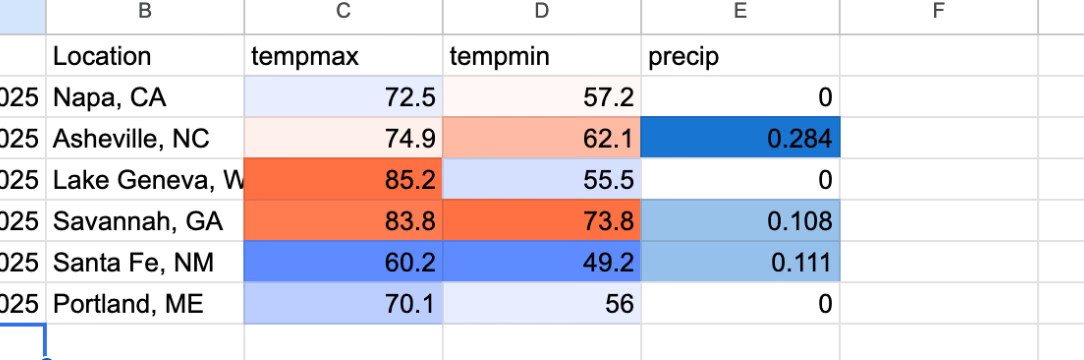
What people use it for
- Event planners: see what late September has actually done at a venue before you commit to the date.
- Travel and cruise planning: put the forecast, or the historical average, next to each stop on the itinerary.
- Researchers, teachers and students: decades of daily observations in a sheet you already know how to use.
- Agriculture: harvest windows, frost dates and growing-season comparisons.
- Insurance and claims: check conditions at a place on a date from the historical record.
- Operations: line weather up against sales, staffing or footfall data you already keep in Sheets.
How it works
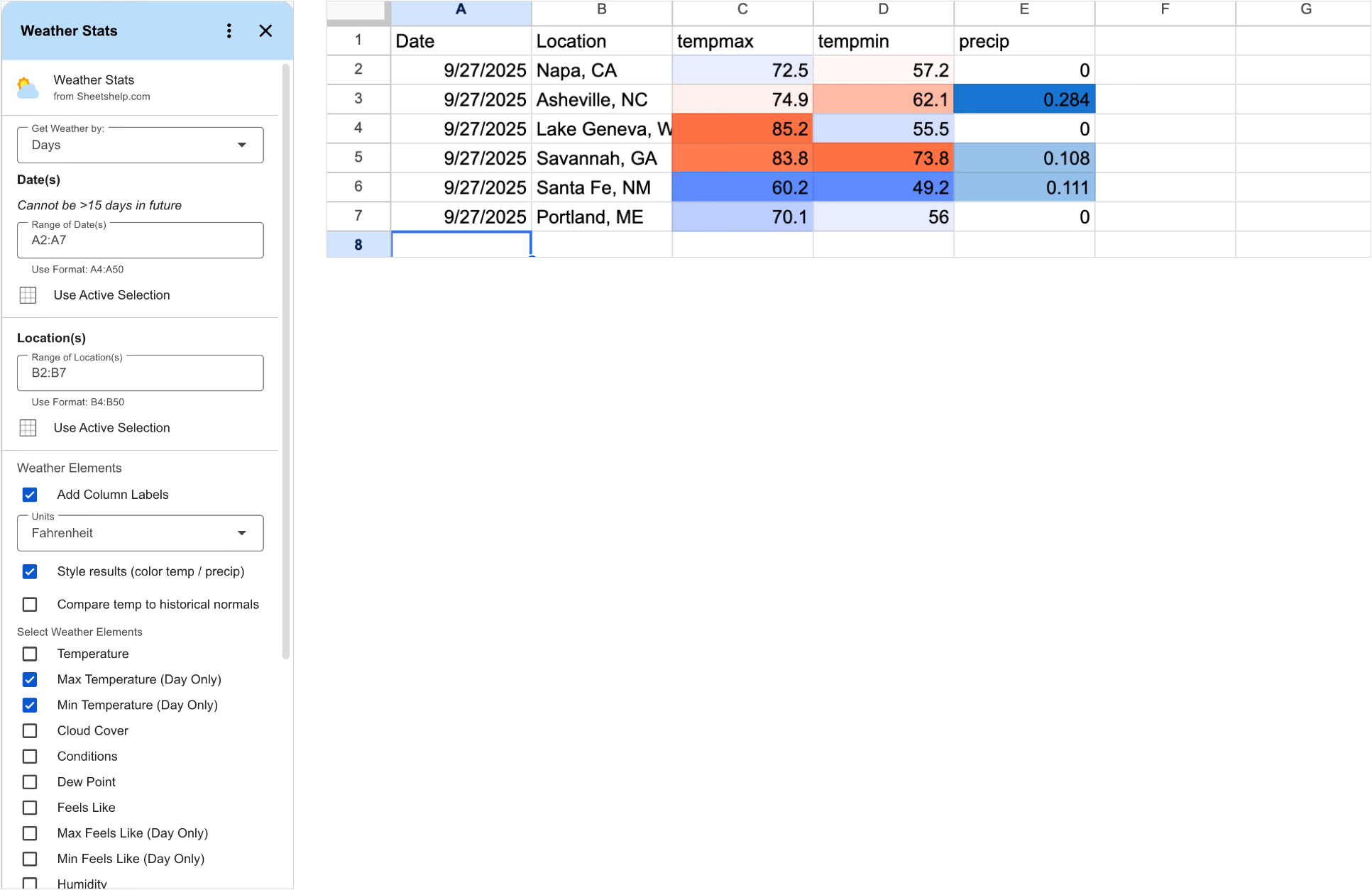
- Point to your dates. Select the column that holds them.
- Point to your locations. A city, an address or a landmark all work.
- Pick weather elements and click RUN. The results fill in beside your data.
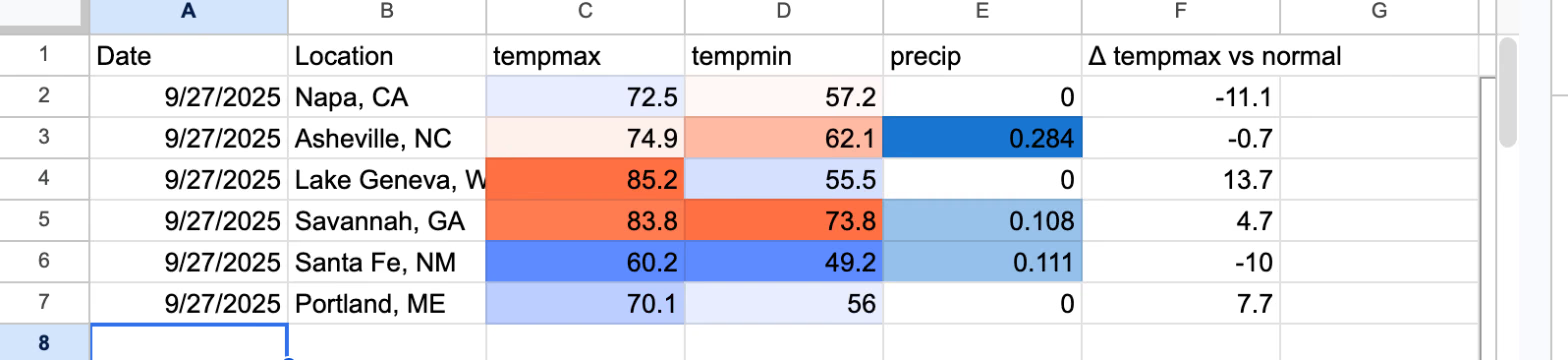
Tick Compare temp to historical normals and a column shows how far each day ran above or below normal for that place.
Long lists are written in batches, so a big job resumes where it left off instead of timing out. Hourly detail gives 24 entries per day at the location’s local time.
What people say
From the Google Workspace Marketplace listing.
“Great work on the weather stats! The figures and numbers were super helpful and easy to follow.”
Emily L.
“This app is used for our vacation planning. We travel all over the world and plan out months in advance… It tracks expenditures, weather and things to do. Very easy to set up and use.”
Robert K.
“Love it. A little quirky to start, but once you get the hang of it, it’s very simple to use.”
Brandon D.
“This has been so helpful!!”
Katlyn D.
Read all reviews on the Marketplace
Pricing
The free plan covers a trip or cruise itinerary, picking a date for an event, or comparing this year against the last fifty. Pro is for people doing it every week.
| Free | Pro — $9/month | |
|---|---|---|
| Runs | 5 per month | Unlimited |
| Rows per run | 25 | No limit |
| Weather elements | Any 3 | All 33 |
| Detail | Daily | Daily or hourly |
| Compare to historical normals | — | ✓ |
| Saved recipes | — | ✓ |
| Charts & conditional formatting | — | ✓ |
| 50 years of history · 15-day forecast | ✓ | ✓ |
A run is one click of RUN. Continuing a long job with “Run Next” is free. Pro is capped at 60,000 rows of weather data per month — about 2,000 a day, every day.
Already installed Weather Stats? Your plan hasn’t changed. Everyone who installed before 1 October 2026 keeps the original free terms — 1,000 records a day, with hourly detail, normals, recipes, charts and formatting all included, permanently. The plan above applies to new installs only.
All 33 weather elements
The add-on has 50 years of historical data and 15-day forecasts, in hourly or daily increments, in Fahrenheit or Celsius, metric or imperial. Some elements are daily-only or forecast-only, as noted.
Show the full list with definitions
- Temperature — the mean temperature.
- Max / Min Temperature (day only)
- Conditions — notable conditions (rainfall, overcast, sunny) reported by weather stations. Not all stations report conditions.
- Cloud Cover — percentage of the sky covered by clouds. The daily value is the mean of the hourly values.
- Dew Point
- Feels Like — how hot it feels, considering heat and humidity. Also Max / Min Feels Like (day only).
- Humidity
- Moon Phase — 0 new moon, 0.25 first quarter, 0.5 full moon, 0.75 last quarter, with crescent and gibbous values between.
- Precipitation — liquid-equivalent rain, snow or other precipitation in inches or millimeters.
- Precipitation Cover (day only) — the share of the period with measurable precipitation. Trace precipitation counts as zero precipitation but still counts toward cover.
- Precipitation Probability and Precipitation Type (forecast only; rain, snow, freezing rain, ice)
- Pressure — sea-level atmospheric pressure in millibars.
- Snow and Snow Depth — new snowfall, and snow on the ground.
- Source Stations (historical only)
- Sunrise and Sunset (day only)
- UV Index — 0 to 10; daily values are the highest hourly reading.
- Visibility — distance that can be seen in daylight, in miles or kilometers.
- Wind Speed, Wind Gust and Wind Direction — plus Max / Mean / Min Wind Speed (day only). Direction is degrees from north.
- Solar Radiation (watts per square meter) and Solar Energy (MJ/m² accumulated over an hour or day)
- Severe Risk (forecast only) — 0 to 100 likelihood of convective storms. Below 30 is low, 30 to 70 moderate, above 70 high.
Video Tutorials


FAQ
Do I need an API key?
No. Install the add-on and it works. Weather data is provided by Visual Crossing.
How far back does the data go?
About 50 years of history, plus 15-day forecasts.
How do I solve the Permission Denied error code?
The error “We’re sorry, a server error occurred while reading from storage. Error code PERMISSION_DENIED.” occurs when you are logged into multiple Google accounts. Log out of the others, restart your browser and start the add-on again.
How do I use the add-on with my iPad?
Open your Google Sheet in the Safari web browser instead of Chrome or the Sheets mobile app. If you still do not see the full version of Google Sheets, go to Settings, then Safari, and select Request desktop website. Toggle this setting to on.
Subscriber Portal | Terms of Service | Privacy Policy | Contact