
Stop Calculating Distances By Hand
The easiest way to generate batch distances and travel times in Google Sheets. No API keys, no coding, and no complex setup required.
⭐ Trusted by 3,000+ Professionals ⭐


The Route Matrix Google Sheets add-on streamlines transportation planning. Simply input your origin and destination locations, and the add-on generates a comprehensive matrix of distance or time.
This powerful tool saves hours of manual calculations, enabling you to optimize routes and schedules efficiently.
Instant Setup
Skip the Google Cloud Console. Install the add-on and start routing in under 60 seconds.
Flexible Inputs
Supports Addresses, Lat/Long coordinates, Plus Codes, and City names globally.
Perfect For:
- Real Estate Site Selection
- Delivery Route Optimization
- Sales Territory Mapping
- Commute Time Analysis
Three Simple Steps

Route Matrix creates a matrix of distances or times between locations in Google Sheets in three easy steps.
- Enter the starting locations
- Enter the ending locations
- Click RUN
Value Comparison
| Feature | Basic (Free) | Premium ($7) |
|---|---|---|
| Route Limit | 9 per run | Unlimited (625+ per run) |
| Speed | Standard | 5x Faster (API Boost) |
| API Setup | None Needed | None Needed |
| Address Cleaning | No | Yes (Auto-format) |
Route Matrix Output
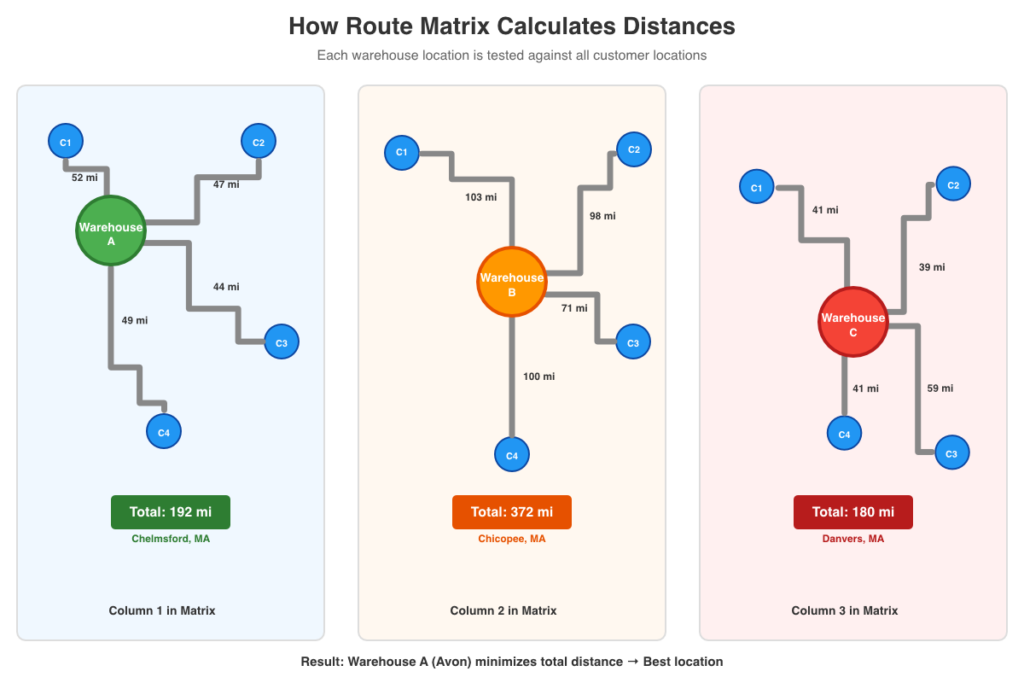
You get the distance or time between all combinations of routes between the starting and ending locations.

Each column in the matrix represents one warehouse’s distances to all customers.
Output Options

- Calculate distances in miles or kilometers.
- Choose between distance or time in minutes
- Use different transportation modes.
- Driving, biking, transit, etc.
- Specify a departure day and time.
Route Matrix fetches starting and ending locations from your Google Sheet, and you tell it what to return – distance or time. Our app sends the addresses confidentially to Google MapsTM and returns the calculated data to your spreadsheet. Use a custom departure date and time to predict travel time based on expected traffic loads.
Use Cases Route Matrix Helps With
- Facility location selection and hub optimization
- Meeting location planning for distributed teams
- Service territory assignment
- Distribution route planning
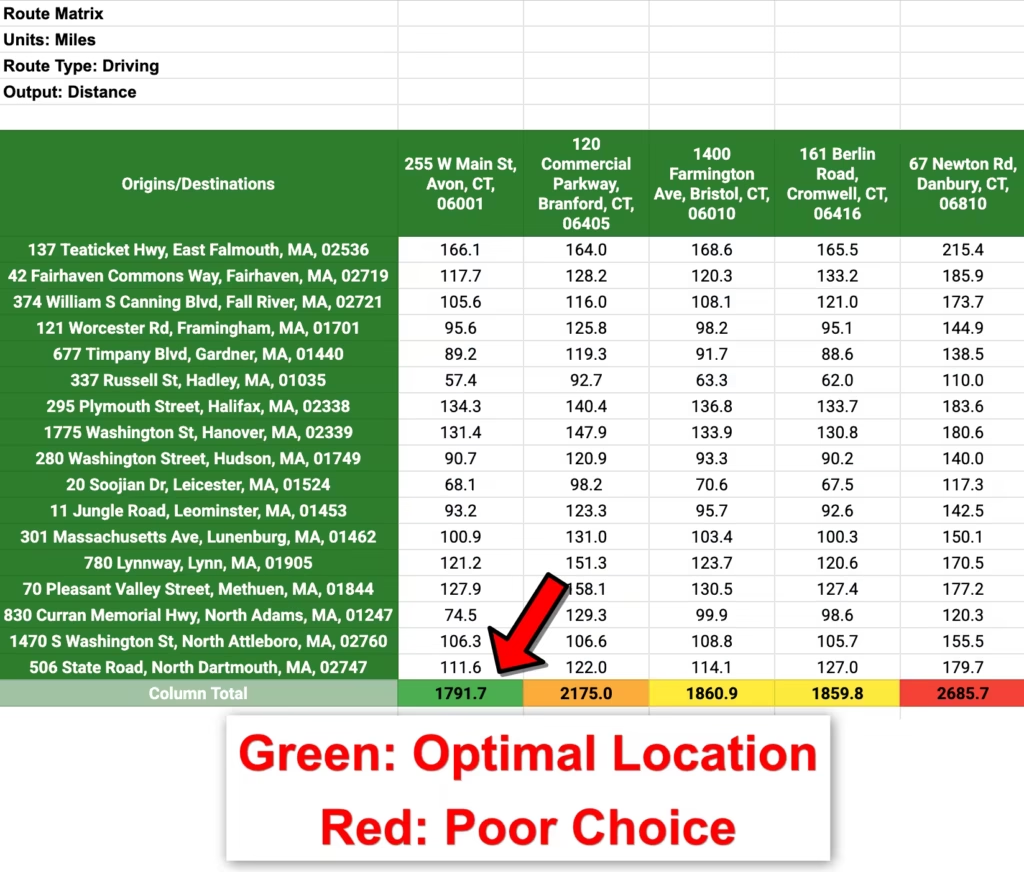
The add-on includes optional conditional formatting that highlights optimal locations – making it easy to identify which facility, meeting spot, or hub minimizes total travel distance or time across all routes.
Run Fast – Premium Feature
The RUN FAST button calculates your routes more quickly and can handle matrices with up to 625 values instead of 9. It cleans addresses before returning them. Also, the run faster button is not subject to the other usage limitations of the RUN button.

Which Mapping Tool Should You Choose?
| Feature | Route Matrix | TripTally | RouteTally | Travel Formulas |
|---|---|---|---|---|
| Primary Goal | Batch Comparison | List Processing | Multi-Stop Optimization | Custom Functions |
| Best For… | Hub/Warehouse Selection | Mileage Logs & A-to-B Trips | Delivery & Field Sales Routes | Dashboards & Power Users |
| The “Magic” | Compares every Start to every End | Calculates 1,000+ pairs instantly | Sequences stops for shortest path | Direct cell-level integration |
| Visual Output | 2D Grid (Matrix) | Parallel Data Columns | Sequenced Itinerary | Single Cell Values |
| Action | View | View | View | View |
Pricing
Basic usage of the add-on is free. Searches of up to 10 simultaneous routes are free. More extensive searches use a faster API and cost $7 per 1,000. You can purchase these faster searches here or through the add-on using the RUN FAST button. Be sure to enter the email that matches your Google account.
FAQ
How many routes can Route Matrix process?
Route Matrixes are created using the free RUN button function per the daily quotas Google imposes on all add-ons and apps. This limits the app’s run time to 30 seconds per request, 1,000 or 10,000 free route requests per day (depending on the type of Google account), and an overall daily run time.
If you use Travel Formulas or TripTally, these add-ons share the same Google Maps free quota.
You can purchase more daily route requests to access the RUN FAST button, which ignores these limits.
Does TripTally work with Place Chips?
Yes, any locations that Google Maps recognizes will work in the TripTally. The chip’s formatting does not impact the validity of a location.
How do I solve the Permission Denied error code?
The error message “We’re sorry, a server error occurred while reading from storage. Error code PERMISSION_DENIED.” occurs when a user is logged into multiple Google accounts. Log out of all other Google accounts, restart your browser, and start the add-on again.
How do I use the add-on with my iPad?
Open your Google Sheet in the Safari web browser instead of Chrome or the Sheets mobile app. If you still do not see the full version of Google Sheets, go to Settings, then Safari, and select Request desktop website. Toggle this setting to on.
Video Tutorials


Real World Examples
How to Choose the Optimal Warehouse Location Using Google Sheets
How to Assign Sales Territories by Drive Time in Google Sheets
Subscriber Portal | Terms of Service | Privacy Policy | Contact