
The short answer: Google Sheets has no built-in function for driving distance, so the total distance and time for a list of addresses has to come from Google Maps through an add-on. Which one depends on your list. If the addresses are the stops of one trip, RouteTally gives you the distance and time of every leg and one total for the trip. If each row is its own start and end pair, TripTally or Travel Formulas gives you a distance for each row.
Which question are you asking?
“Total distance for a list of addresses” can mean four different things. Find your list in the table:
| Your list looks like | Use | You get |
|---|---|---|
| One column of addresses, visited in order: a delivery run, a day of client visits | RouteTally | The distance and time of every leg, and one total for the whole trip |
| Two columns, a start address and an end address on each row: a mileage log | TripTally | A distance, a time and a Google Maps link for each row |
| Start and end addresses you want to calculate with a formula in a cell | Travel Formulas | =TRAVELDISTANCE and =TRAVELTIME in any cell |
| A list of starting points and a list of destinations, and you want every combination | Route Matrix | A grid of distances or times |
Total distance and time for one route, in four steps
- Put the addresses in one column, in the order you will visit them. Add the city and ZIP code to each address.
- Open RouteTally from the add-ons panel on the right of your sheet and select the cells that hold the addresses. Pick miles or kilometers, and Driving, Walking or Bicycling.
- Click Run.
- Read the TOTAL row at the bottom of the new tab.
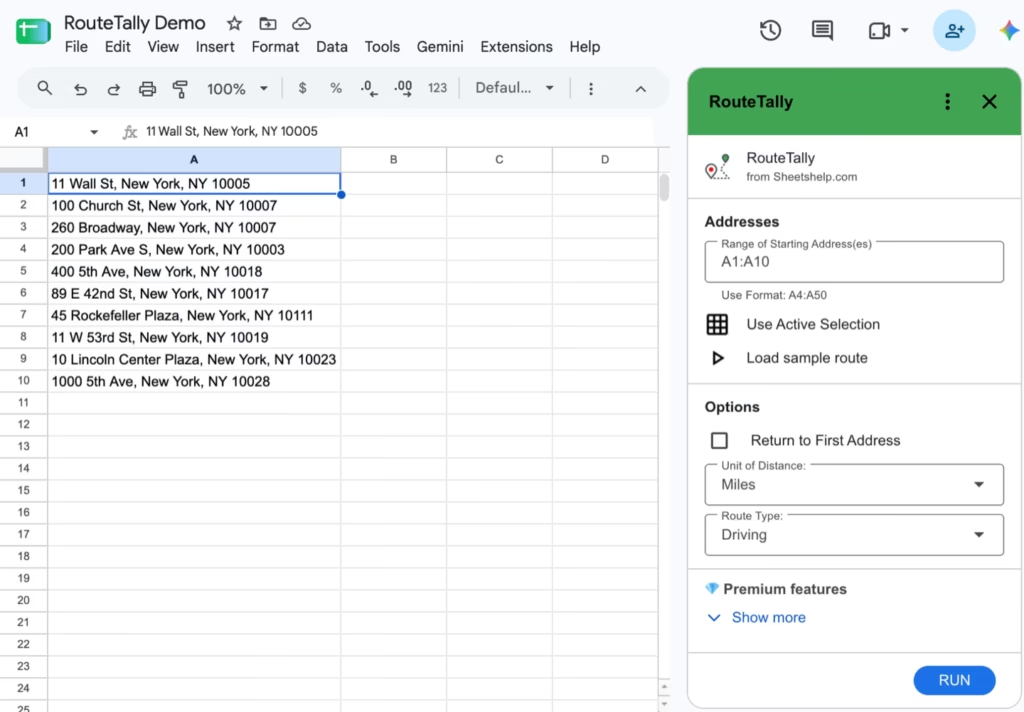
RouteTally creates a new tab with one row per leg: the start address, the end address, the distance and the time. The last row is the total.
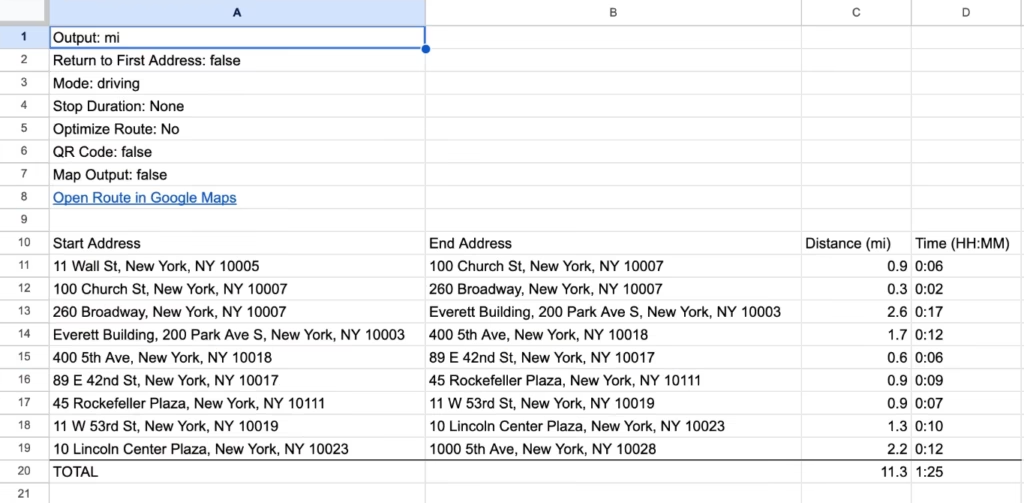
In this example, ten addresses in Manhattan run by car in the order listed make nine legs. The first is 0.9 miles in 6 minutes, the second 0.3 miles in 2 minutes, and so on. The TOTAL row reads 11.3 miles and 1:25. The “Open Route in Google Maps” link above the table opens the whole route. Want to try the same list? Make a copy of the demo sheet, install RouteTally, and run it on A1:A10.
What the total includes
- Every leg between consecutive addresses, in the order of your list: nine legs for ten addresses.
- The trip back, if you tick Return to First Address.
- Time at each stop, if you set a Stop Duration (Premium). RouteTally adds a Stop row between the legs and counts those minutes in the total.
- Google’s estimate for the mode you chose. Public transit works only for a route with just a start and a destination, because Google does not plan transit routes with stops in between.
One thing to know before you check the arithmetic: the legs are rounded for display (distance to a tenth of a mile, time down to the minute), but the total is added up from the exact figures. In the example the visible legs add to 11.4 miles and 1:21, while the total reads 11.3 miles and 1:25. The total is the accurate one.
If each row is its own start and end
Then you do not want one total for a trip. You want a distance for every row, and the tools are different.
- TripTally reads the start addresses from one column and the end addresses from the next, and fills in the distance, the time and a Google Maps link for each row. It handles 1,000 or more pairs at once, which makes it the tool for mileage logs and expense reports. You can also give it a departure date and time to estimate travel time in traffic.
- Travel Formulas does the same with formulas you type in a cell:
=TRAVELDISTANCE(A2, B2, "driving", "mi")for the distance and=TRAVELTIME(A2, B2)for the time. Fill them down the column, and add the distances with=SUM(C2:C100).
Frequently asked questions
Does Google Sheets have a built-in function for the distance between addresses?
No. Sheets has no function that looks up driving distance. A formula on latitude and longitude gives only the straight-line distance. Road distance and travel time come from Google Maps, through an add-on.
Is it road distance or straight-line distance?
Road distance from Google Maps, for the mode of travel you choose: driving, walking, bicycling or transit.
How many addresses can I add up in one route?
RouteTally runs up to 10 stops on the free plan and up to 100 on Premium. For a longer list, see our guide to planning a route with more than 25 stops.
Can I get kilometers instead of miles?
Yes. RouteTally has a miles or kilometers choice in the sidebar, and the total follows it.
Can I include the time I spend at each stop?
Yes, with a Premium subscription. Set a Stop Duration in minutes, and RouteTally adds it between the legs and into the total time.
Do I need a Google Maps API key?
No. RouteTally works as soon as you install it. There is no Google Cloud account or key to set up.
Try it on your own list. The first 10 stops are free. See the features and plans.